Anomaly Detection
The Anomaly Detector checks your live data with rules and statistical outlier tests and lists what looks wrong: a receipt that does not match its ASN, expired stock still on the shelf, a count with a big variance, a pick that will miss its deadline, unusual stock movements. Each anomaly shows what was expected and what was actually found, how far off it is, and a suggested action. You then investigate, escalate or dismiss it.
Where: AI & Automation → Anomaly Detection
The anomaly list
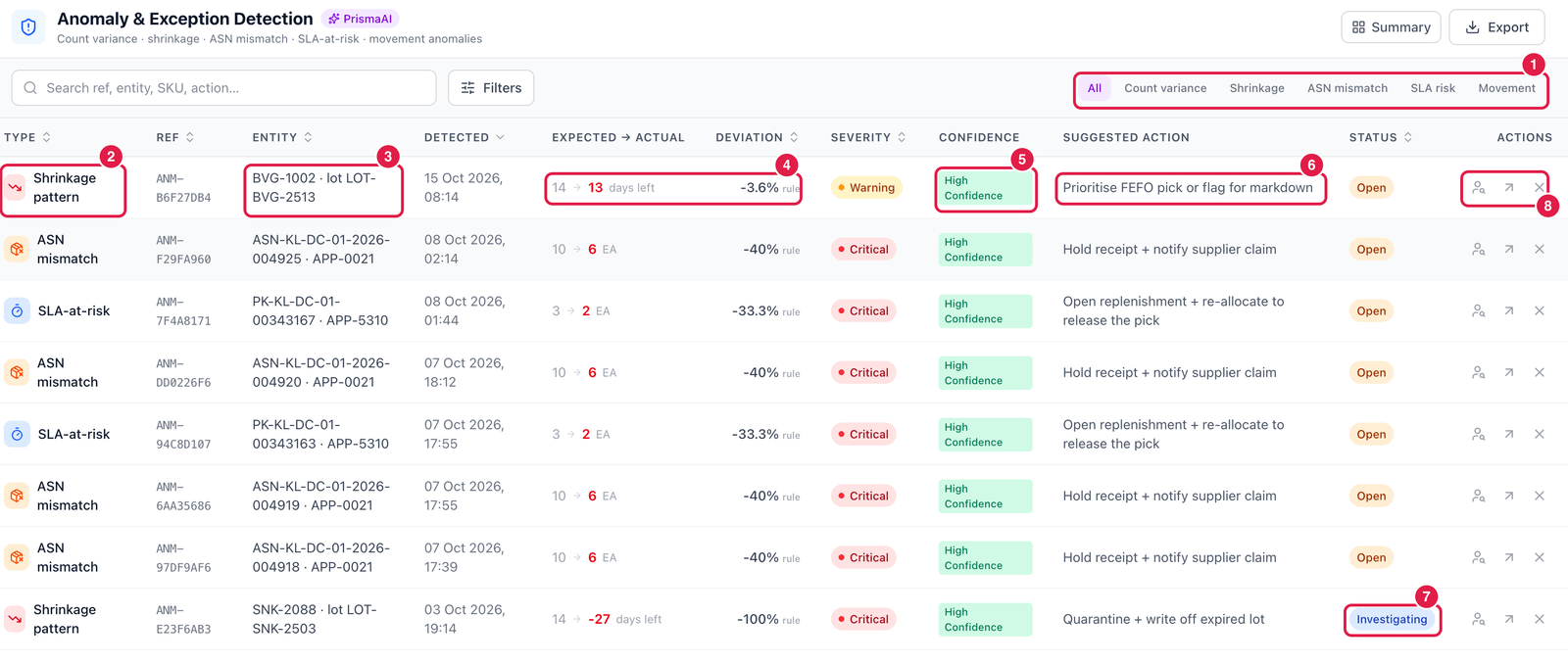
- Type filter — all, Count variance, Shrinkage, ASN mismatch, SLA risk or Movement.
- Type — e.g. Shrinkage pattern, ASN mismatch, SLA-at-risk.
- Entity — the document, item, lot or bin concerned.
- Expected → actual and deviation — e.g. an ASN said 10, the receipt counted 6: −40 %. rule means it was found by a rule; a number with σ means a statistical outlier.
- Confidence of the rule that found it.
- Suggested action — e.g. Hold receipt + notify supplier claim, Quarantine + write off expired lot.
- Status — Open, Investigating or Resolved (dismissed anomalies leave the list).
- Actions — Investigate (assign an investigator and write a note), Escalate (with a note) and Dismiss (false positive) (with a reason code).
Fix the cause, not only the alert
An anomaly is a pointer. Open the document behind it (click the entity), correct the real problem — receive the missing units, write off the expired lot, re-allocate the order — and the anomaly resolves itself at the next run.