AI Command Center
The AI Command Center collects every open suggestion (insight) from the six engines in one feed: pick faces to refill, items to re-slot, things to reorder, anomalies to investigate. Each insight says what was found, shows the numbers behind it, and has an action button that does something real — for example it creates a replenishment task or a purchase order. You can also acknowledge or dismiss it.
Where: AI & Automation → AI Command Center
The life of an insight
The feed
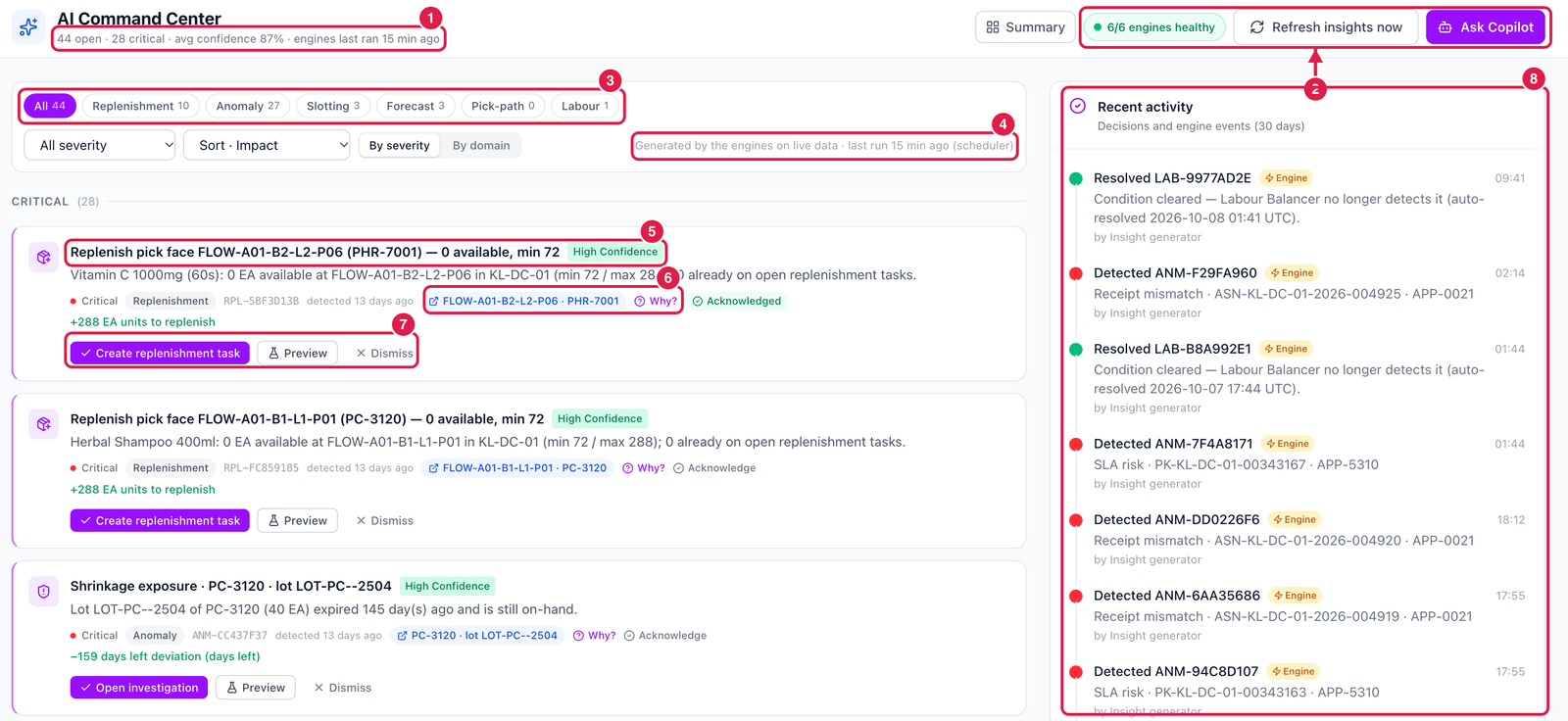
- Headline — how many insights are open and critical, the average confidence, and when the engines last ran.
- Engine health, Refresh insights now (run all engines immediately instead of waiting up to 15 minutes) and Ask Copilot.
- Domain tabs — all insights, or only Replenishment, Anomaly, Slotting, Forecast, Pick-path or Labour, with counts. Next to them: severity filter, sort (impact, confidence, newest) and grouping.
- Source — the insights are generated by the engines on live data, and when they last ran.
- Insight — the title says what was found; the badge shows the confidence. Below: the details, severity, domain, the insight number and when it was first detected.
- Evidence and Why? — a link to the bin, item or document concerned, and Why?, which explains the rule and the numbers that triggered it.
- Actions — the main button (here Create replenishment task), Preview (see exactly what the button will do before you click it) and Dismiss.
- Recent activity — what people decided and what the engines detected or auto-resolved in the last 30 days.
What the action buttons do
| Button | What really happens |
|---|---|
| Create replenishment task | creates replenishment task(s) into that pick face from reserve stock (oldest expiry first) |
| Raise purchase order | creates a purchase order with the item's preferred supplier |
| Post re-slot transfer | posts a bin-to-bin transfer of the free stock to the suggested bin |
| Release pick sequence | writes the optimised walking order to the wave's open pick tasks |
| Open investigation | opens an investigation on the anomaly, assigned to you |
| Mark as actioned | only records that you handled it — no document is created |
Dismiss with a reason
If a suggestion is wrong, Dismiss it and say why. Dismissals count against the engine's quality numbers in the Model Center, and your administrator can make a reason compulsory.