Model Center
The Model Center is where you see and control the engines. Each card states the engine's algorithm in plain words, whether it is healthy, when it last ran, and its quality metric measured on your own data — or Not enough data when there is too little to measure. You can switch an engine off, set the confidence gate (suggestions below it are hidden), tune parameters, and download the decision log of everything people accepted or dismissed.
Where: AI & Automation → Model Center
The engines
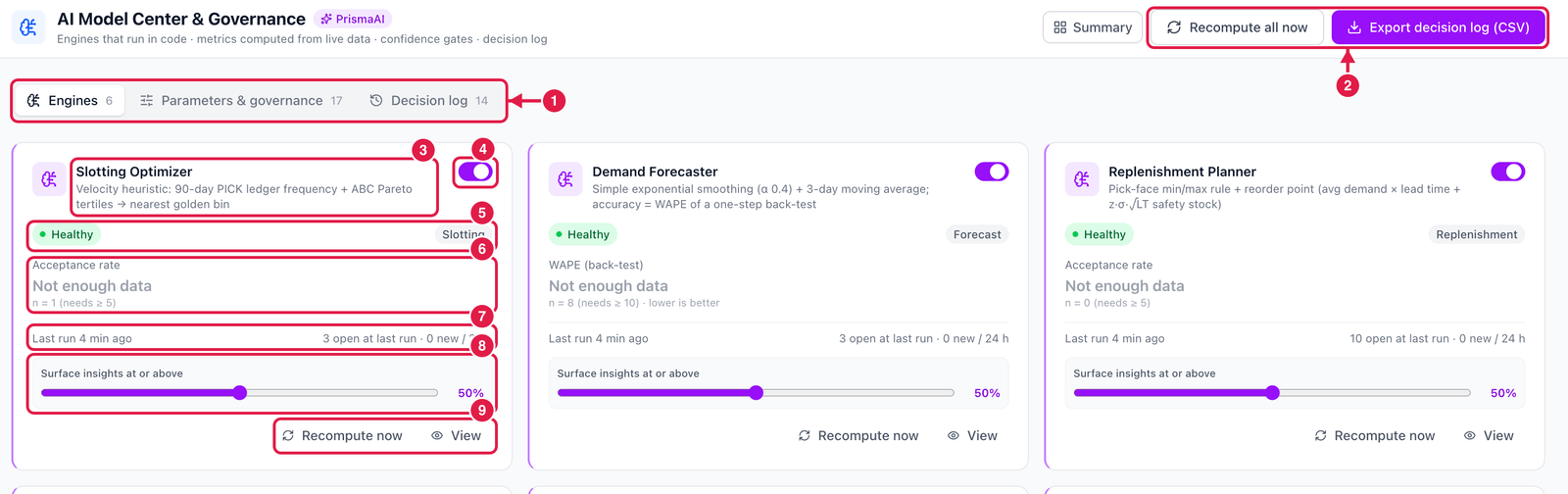
- Tabs — Engines, Parameters & governance (engine settings and rules such as require a reason to dismiss and mask worker names) and Decision log (who accepted, dismissed or escalated what, and when).
- Recompute all now and Export decision log (CSV).
- Engine and algorithm — e.g. Slotting Optimizer: velocity heuristic: 90-day pick frequency + ABC Pareto tertiles → nearest golden bin.
- On / off — a switched-off engine produces no new suggestions.
- Health and domain.
- Quality metric — for example acceptance rate, precision (confirmed ÷ confirmed + dismissed) or WAPE (forecast error, lower is better). It shows Not enough data and the sample size (n = 1, needs ≥ 5) until there are enough real decisions to measure.
- Last run — when the engine last ran, how many suggestions were open after it, and how many are new in 24 h.
- Surface insights at or above — the confidence gate. Suggestions with a lower confidence are not shown.
- Recompute now and View (details and history of this engine).
Good to know
- The engines run automatically every 15 minutes. Recompute now runs them immediately.
- Quality metrics come only from real outcomes — what users accepted, dismissed or confirmed, and back-tests on your own history. Nothing is pre-filled.
- Changing a parameter or the gate is recorded in the decision log.