Return to Vendor (RTV)
A return to vendor (RTV) sends goods you received back to the supplier — because they failed QA, arrived damaged, or were not what you ordered. Posting the RTV takes the stock out of the warehouse with a reason. Copy it from the GRN so PrismaWMS knows exactly which delivery the goods came from and never returns more than was received.
Where: Inbound → Return to Vendor
How an RTV works
The list

- New RTV — create a return.
- GRN — the delivery the goods came from. Click to open it.
- Reason — why the goods go back, e.g. QA-REJ (failed inspection).
- Status — Posted, or Reversed when a posted return was undone.
Create a return
Click New RTV, choose the warehouse, then Copy from… → GRN and pick the delivery.
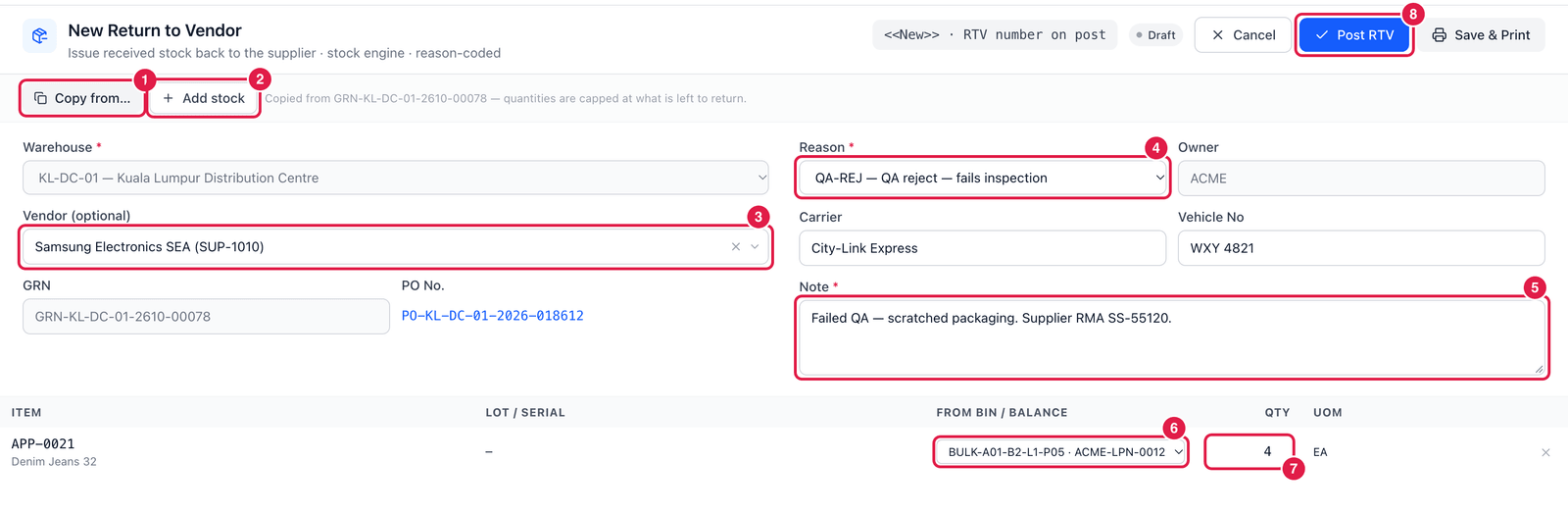
- Copy from… — copy lines from a GRN or receipt. Quantities are capped at what has not been returned yet.
- Add stock — or pick any stock in the warehouse without a GRN.
- Vendor — taken from the GRN. (Optional, unless your settings require a supplier.)
- Reason — a reason that allows stock to decrease: return disposition, QA reject, damage, write-off … Reasons that need approval cannot be used here, because an RTV posts immediately.
- Note — what is wrong, and the supplier's return authorisation number if they gave you one.
- From bin / balance — exactly which stock to send back (bin, LPN, status). The lot and expiry travel with it.
- Qty — how many to return.
- Post RTV — post. The stock leaves the warehouse and the RTV gets its number. Save & Print also prints the return note for the driver.
Fill in Carrier and Vehicle No so the return can be traced.
Good to know
- Only posted GRNs from the same warehouse can be returned.
- Reverse a posted RTV if it was made by mistake: the stock comes back and the GRN quantity becomes returnable again.
- Stock that is in transit between warehouses cannot be returned.
- For deliveries from an ERP, a return confirmation is queued for that system, just like a receipt confirmation.