Approvals
Some changes must be checked by a second person before they happen — a large adjustment, releasing stock from QA hold, a count variance, a receipt with too many or too few units. Those changes wait here as approval requests. A user with the right approver role approves or rejects them; approved requests are then posted. Nobody can approve their own request.
Where: Inventory → Approvals
How approval works
Whether something needs approval is set on its reason code — always, or above a quantity or value — see Reason Codes.
The approvals inbox
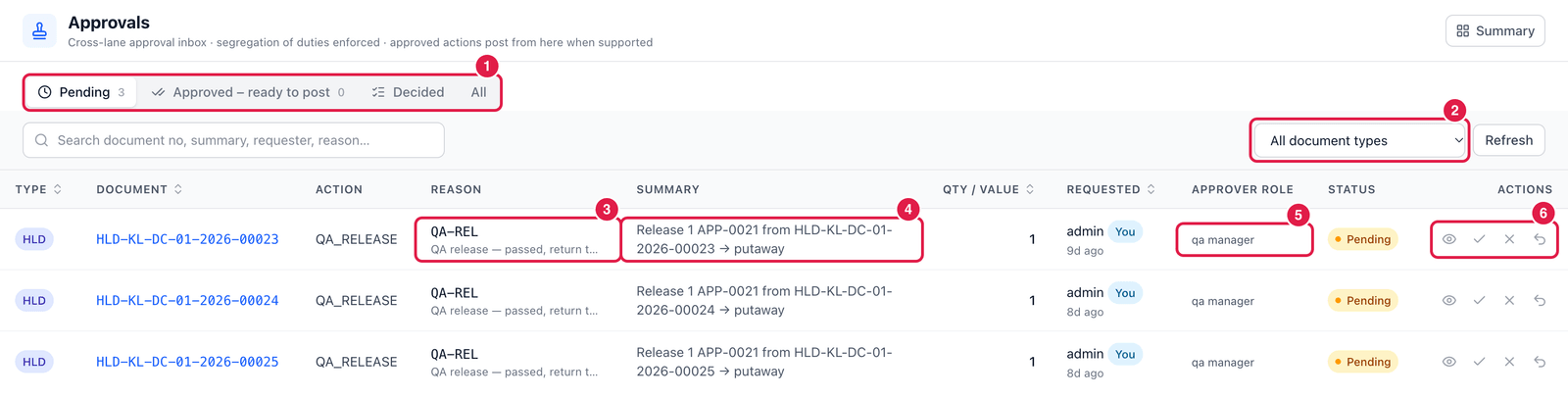
- Tabs — Pending (waiting for a decision), Approved – ready to post, Decided and All.
- Document type — filter by adjustment, hold, cycle count, stock take, receipt, GRN, short pick, PO, ASN, sales order, return, transfer, transfer order or production.
- Reason — the reason code that required approval, e.g. QA-REL — QA release, passed, return to stock.
- Summary — exactly what will happen, e.g. Release 1 APP-0021 from HLD-… → putaway.
- Approver role — who may decide: e.g. QA manager, Supervisor, Finance.
- Actions — Details, Approve, Reject and, for your own requests, Withdraw request.
You cannot approve or reject a request you made yourself (You is shown next to your own requests). Ask a colleague with the approver role.
After approval
Where the inbox knows how, the approved action is posted straight away from here. Otherwise the request moves to Approved – ready to post: open the original document (link in the Document column) and post it there — the approval is used once, then it is consumed.
Good to know
- Reject asks for a reason; the requester sees it and nothing changes in stock.
- Notifications can alert approvers when new requests arrive (Administration → Notifications).