Bin / Locations
This screen shows every bin of a warehouse with what is in it right now: quantity, reserved and held stock, SKUs and pallets, how full it is, and when stock last moved. From here you can block a bin (no new stock may be put in), freeze it for counting, put all its stock on hold, or request a count.
Where: Inventory → Bin / Locations · Bins themselves are created in Master Data → Locations.
Bin statuses
The bin list
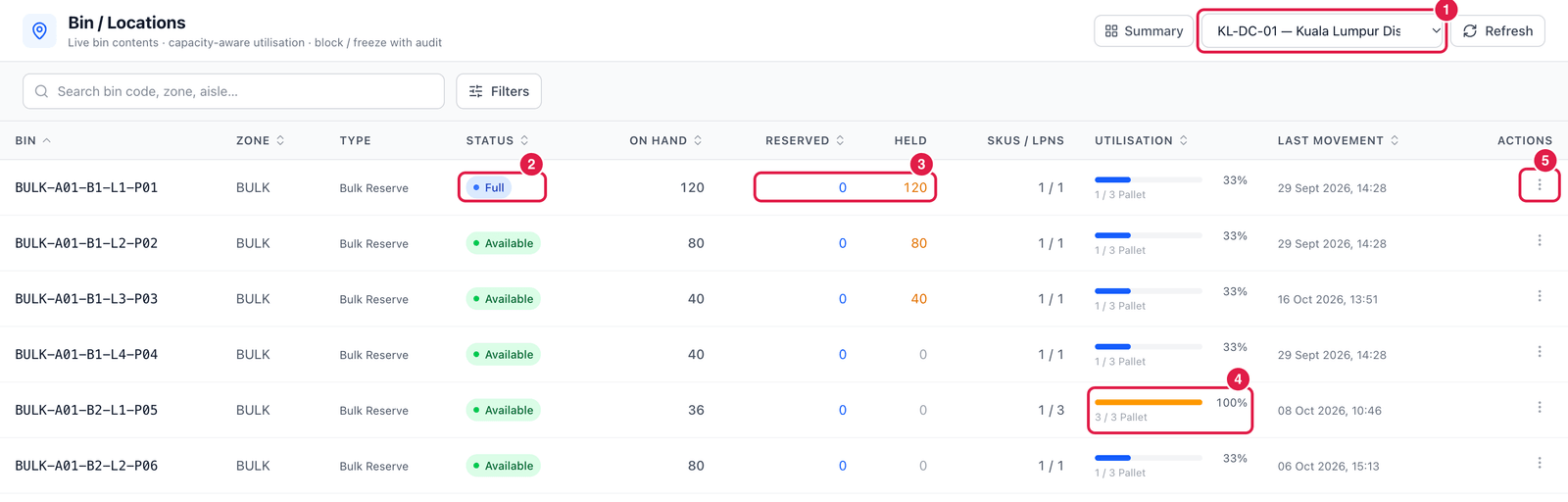
- Warehouse — choose the warehouse to look at.
- Status — Available, Full, Blocked, Counting, Inactive.
- Reserved and Held — how much of the bin's stock is reserved for orders, and how much is in a non-available status (for example on hold).
- Utilisation — how full the bin is against its capacity (here 3 / 3 Pallet = 100 %). Capacity comes from the bin's set-up in Master Data.
- ⋯ Actions:
- View detail — the bin's settings and every balance in it;
- Block bin / Unblock bin;
- Freeze for count / Unfreeze;
- Hold all stock in bin — put every balance in the bin on hold;
- Request count (opens Cycle Count);
- Open in ledger.
What blocking and freezing do
A blocked bin (and a bin marked Full) refuses new stock — putaway, moves and transfers into it are refused. A bin frozen for counting refuses every movement until the count is posted. Changing a bin's status asks for a reason and is written to the audit trail.
Good to know
- View detail also shows whether the bin is pickable / putaway-able, its pick sequence, mixing rule, allowed SKU or owner, weight, and when it was last counted.
- Use Filters to find full, empty, blocked or counting bins of a zone.