Replenishment
Pickers take goods from pick faces — the easy-to-reach bins near the floor. When a pick face runs low, someone must bring more stock from reserve (bulk storage). Replenishment watches every pick face against its min / max level, works out how much is needed, finds the reserve stock to use (oldest expiry first — FEFO), and creates replenishment tasks. When a worker confirms a task, the stock is moved from the reserve bin to the pick face.
Where: Inventory → Replenishment
How replenishment works
Each pick face has a trigger, set on the location in Locations:
- Min/Max — when the available quantity drops to the min, fill up to the max.
- Top-off — always fill up to the max, whatever the level.
- Demand — not refilled by min/max; a task is raised when a wave finds the face short.
Tasks that are already open count as incoming, so the same face is not tasked twice.
The pick faces
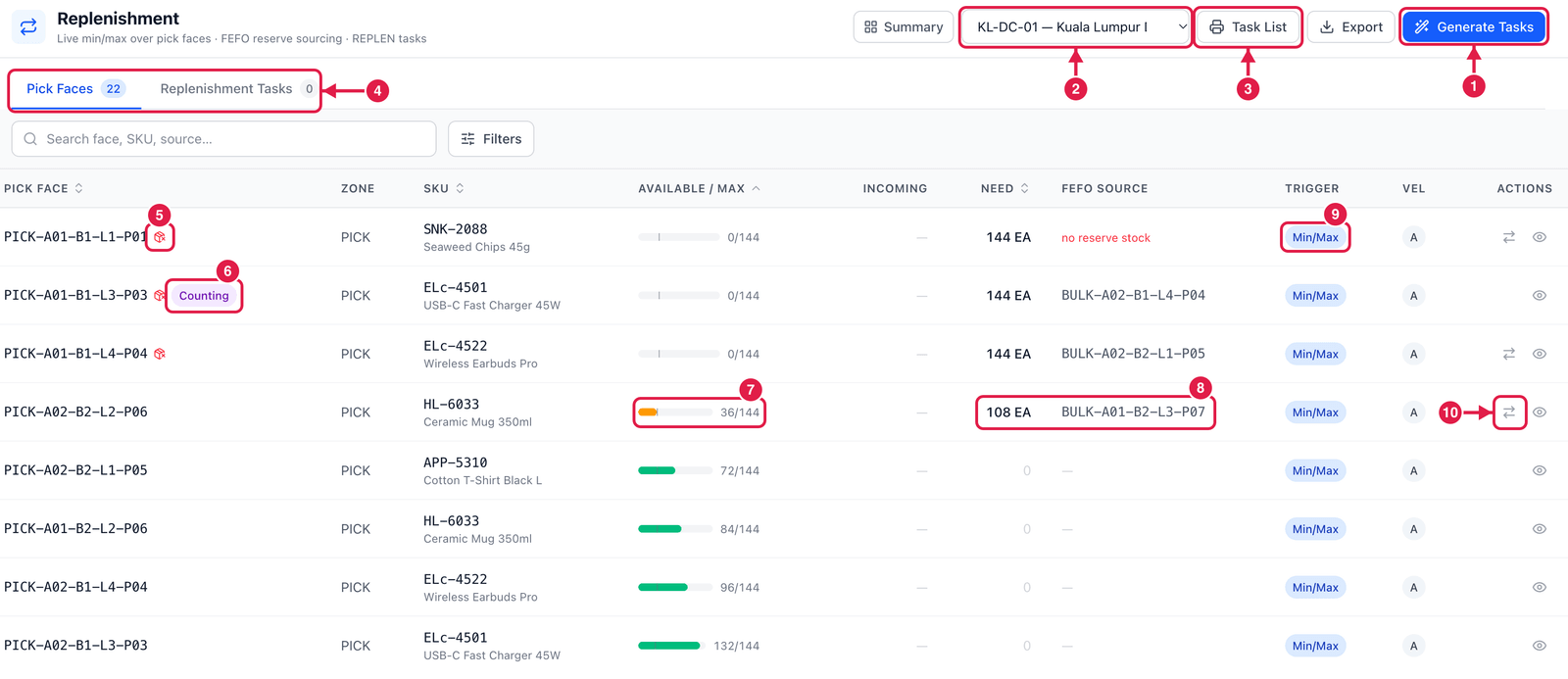
- Generate Tasks — creates a task for every pick face that needs stock (min/max and top-off faces).
- Warehouse — replenishment works per warehouse.
- Task List — prints the open tasks as a paper list for the workers.
- Tabs — Pick Faces (every face with its level) and Replenishment Tasks (the tasks created).
- Red box icon — the face is empty (stock-out). Fill these first: their tasks get the highest priority.
- Counting — the face is frozen for a count. No task is created for it until the count is posted.
- Available / Max — the bar shows how full the face is; the thin line in the bar marks the min.
- Need and FEFO source — how much is needed to reach the max, and the reserve bin it will come from. no reserve stock (red) means there is nothing free in reserve to bring.
- Trigger — Min/Max, Top-off or Demand. Vel shows the face's velocity class (A = fast movers).
- Create task for this face — make a task for just this one face.
Do a replenishment task
Open the Replenishment Tasks tab. Each task shows the SKU, From (the reserve bin, or FEFO at confirm), To face, the quantity and its status.
- Assign — give the task to a worker (optional).
- Start — the worker begins; the task becomes In progress.
- The worker takes the stock from the reserve bin to the pick face.
- Confirm — enter the Qty moved and, if you took it from another bin, scan that Source bin. If the planned bin no longer has enough, PrismaWMS finds the rest in other reserve bins (FEFO). Tick Close the task short to finish with less than planned; otherwise the rest stays open. The move is posted to the stock ledger: reserve bin −, pick face +.
A task can be cancelled with a reason while it is open. A bin-to-bin transfer can also carry out a task: use Copy from… on the transfer form and pick the task.
Good to know
- Only free, available stock in reserve bins is used — never stock from another pick face.
- Not-yet-started tasks raised for a wave or an order are cancelled automatically when that wave or order is cancelled.
- Generate Tasks tells you which faces were skipped and why (no slotted SKU, no reserve stock).
Min should cover the picks until the task is done; max is what physically fits in the face. If a face empties every day, raise its max or give the item a bigger face.