Stock Ledger
The stock ledger is the diary of your warehouse. Every change to stock — receipt, putaway, pick, move, adjustment, count, transfer, hold, production — writes a line here, automatically. Each line says what changed, by how much, which document caused it, who did it, and what the balance was afterwards. Nobody can edit or delete a line: a mistake is corrected by a reversal, which is a new line. So you can always answer "where did these units go?"
Where: Inventory → Stock Ledger
How the ledger is written
A move has two legs: one that takes units out of the source and one that puts them into the target. A receipt has only an in leg; a shipment only an out leg.
Read the ledger
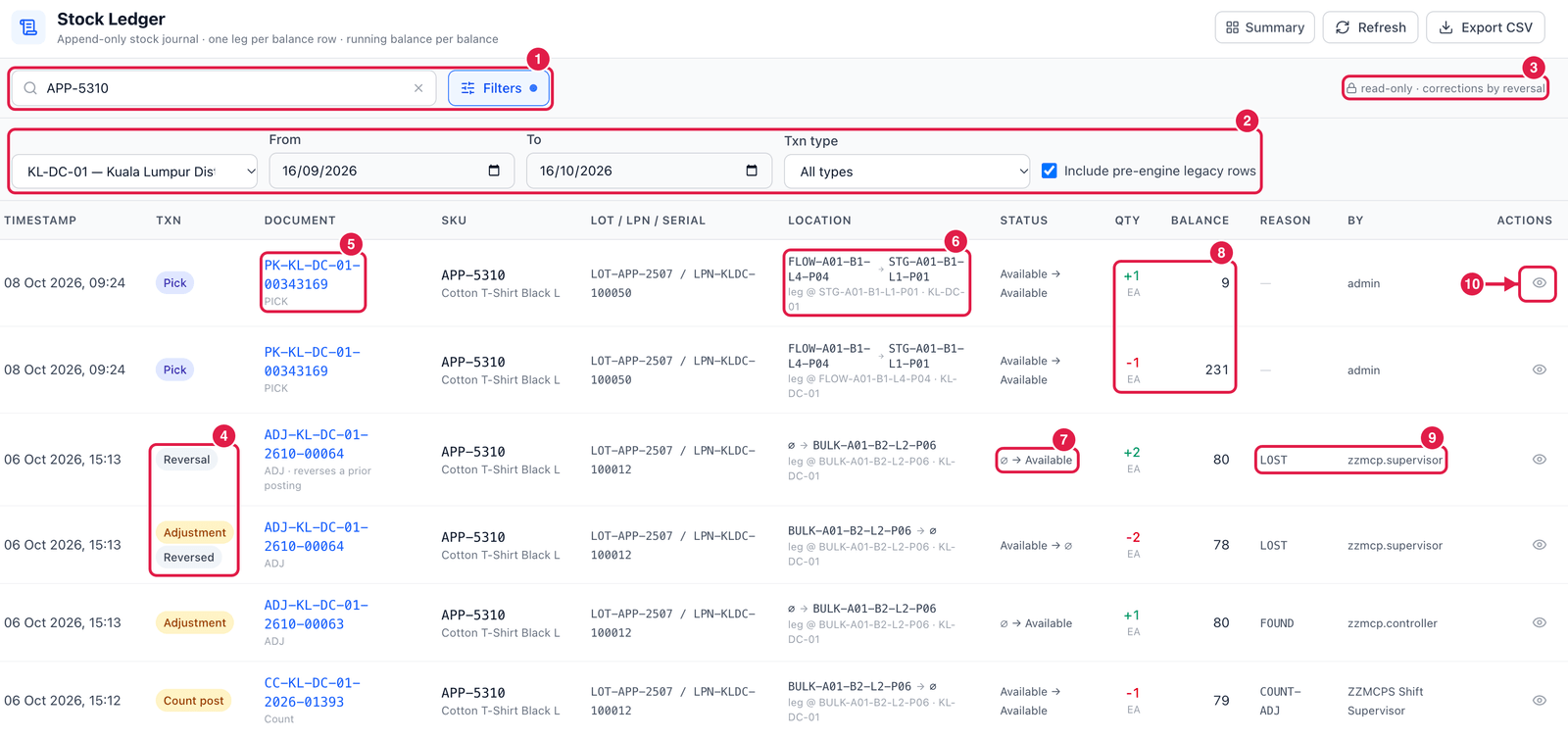
- Search and Filters — type a SKU, and open Filters for more options.
- Filter row — warehouse, From / To dates (the last 30 days by default), Txn type (receipt, pick, move, adjustment, count post, transfer in / out, reversal…) and Include pre-engine legacy rows (older history written before the stock engine was introduced; these rows are labelled legacy).
- Read-only — nothing here can be changed; corrections are made by reversing the document.
- Txn — the kind of change. Reversal undoes an earlier line; that earlier line shows Reversed.
- Document — the document that caused the change (click it to open). Below it: the document type, and for a reversal reverses a prior posting.
- Location — from → to, and leg @ the bin this line is about.
∅means "nothing":∅ → BULK-…is stock that appeared (received or found);BULK-… → ∅is stock that left (shipped or written off). - Status — the stock status before → after, e.g. Available → Damaged.
- Qty and Balance — the change (green +, red −) and the quantity left in that balance row after it.
- Reason and By — the reason code (e.g. LOST, FOUND, COUNT-ADJ) and the user who did it.
- View — open the line's details.
Follow the trail
Click View on a line. Besides the details (owner, warehouse, lot, LPN, flags), the panel has three buttons:
- History of this balance — every line ever written for this exact stock row (bin + lot + LPN + status).
- All lines of … — every line of the same document, e.g. all legs of one pick.
- Open document — jump to the pick, adjustment, count or transfer itself.
A count found 2 units missing? Filter the ledger by the SKU and the bin, clear the dates, and read from the bottom up: you see every receipt, pick and move that touched that bin, with the running balance after each one.
Good to know
- Export CSV downloads the lines that match your filters — handy for auditors.
- The ledger cannot be edited by anyone, including administrators. Use the document's Reverse action (for example on an adjustment or a bin-to-bin transfer).
- Stock Reconcile checks that the ledger and the stock balances still agree.