Stock Reconcile
PrismaWMS keeps stock in three places that must always agree: the balance (how many are in the bin), the ledger (every change that ever happened), and the reservations (what is promised to orders). Stock Reconcile checks every balance against the other two and lists anything that does not add up. Normally the answer is "No issues — every balance reconciles". Run it after a data import, when a number looks wrong, or as a regular health check.
Where: Inventory → Stock Reconcile
What is checked
The reconcile screen
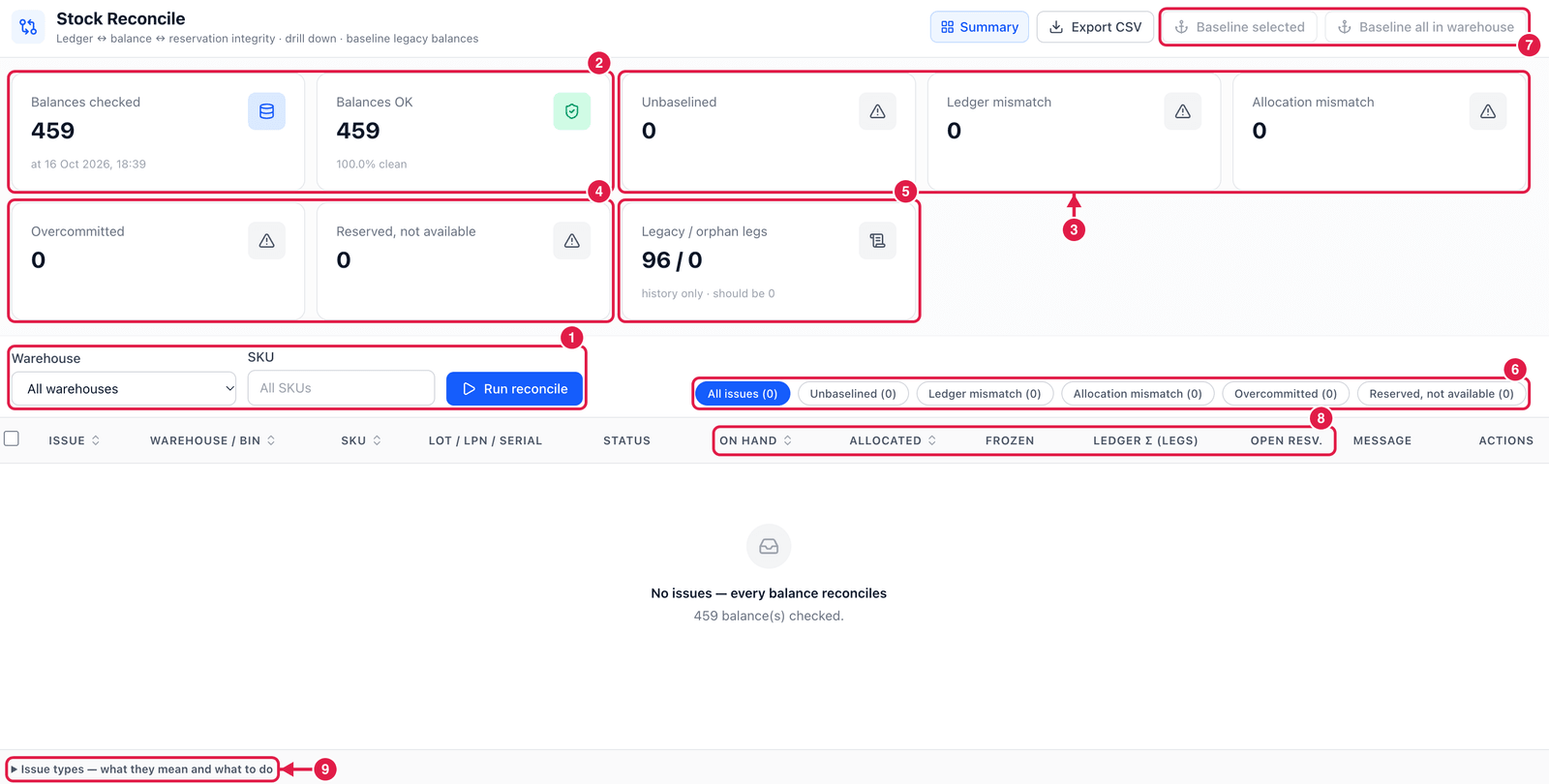
- Warehouse, SKU and Run reconcile — check everything, or narrow it down to one warehouse or SKU.
- Balances checked and Balances OK — how many balance rows were checked (and when), and how many are clean.
- Unbaselined, Ledger mismatch and Allocation mismatch — counts of the first three issue types (see the table below).
- Overcommitted and Reserved, not available — counts of the other two issue types.
- Legacy / orphan legs — ledger lines written before the stock engine (history only), and lines whose stock row no longer exists. Orphan legs should always be 0.
- Issue filter — show all issues or only one type.
- Baseline selected / Baseline all in warehouse — fix unbaselined balances (see below).
- The numbers behind each issue — on hand, allocated, frozen, the ledger total (and how many legs) and the open reservations, side by side, so you can see what differs.
- Issue types — what they mean and what to do — open this help at the bottom of the screen at any time.
The issue types
| Issue | What it means | What to do |
|---|---|---|
| Unbaselined | The balance has stock but no ledger lines — it is older than the stock engine. | Baseline it: an Opening balance line is posted for the current quantity. The engine also does this automatically the first time the balance is touched. |
| Ledger mismatch | The ledger lines do not add up to the quantity on hand. | Open the ledger for that balance and find the change that did not go through the engine. |
| Allocation mismatch | The allocated quantity differs from the open reservations behind it. | Unallocate and re-allocate the affected orders. |
| Overcommitted | Allocated + frozen is more than on hand — the balance cannot keep its promises. | Unallocate or unfreeze the excess, or count the bin to correct the quantity. |
| Reserved, not available | Stock is reserved although it is not Available (e.g. on hold or blocked). | Unreserve and allocate from available stock, or release the hold. |
Baselining needs a supervisor
Baseline posts opening-balance lines into the ledger, so it needs the approve adjustments permission. It only records the quantity that is already there — it never changes stock.
Good to know
- Reconcile only reads — running it never changes stock. Run it as often as you like.
- Export CSV saves the issue list, for example to send to your system administrator.
- A clean result (100% clean) means every balance matches its ledger and its reservations at that moment.