Number Sequences
Every document PrismaWMS creates gets a number, such as RCPT-KL-DC-01-2610-00104. A number sequence
decides what that number looks like: the prefix, whether it contains the warehouse, owner,
year or month, how many digits the running number has, and when it starts again at 1.
Every document type already has a sequence — usually you only need to adjust the format.
Where: Master Data → Number Sequences
How a number is built
Each combination in the scope has its own counter. With scope Warehouse + Month, KL-DC-01 and PEN-XD-22 count separately, and both start again at 1 every month. Numbers are issued inside the same save as the document, so they are unique and without gaps within their counter.
| Token | Becomes | Example |
|---|---|---|
{YYYY} / {YY} | year (4 or 2 digits) | 2026 / 26 |
{MM} / {DD} | month / day | 10 / 16 |
{WH} | warehouse code | KL-DC-01 |
{OWNER} | owner short code | ACME |
{SEQ} / {SEQ:5} | running number (default width / 5 digits) | 00104 |
The list
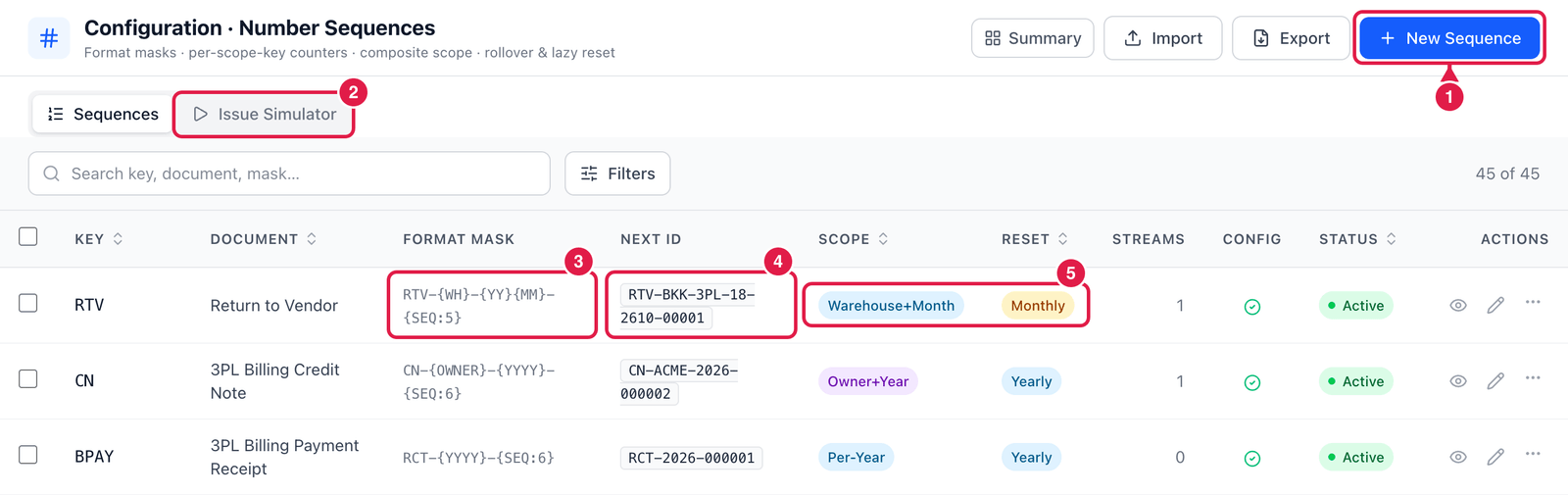
- New Sequence — add a sequence (rarely needed — every document type already has one).
- Issue Simulator — preview the next number without using it (see below).
- Format mask — the pattern of the number.
- Next id — what the next number would look like today.
- Scope and Reset — which counters exist (Warehouse + Month = one per warehouse per month) and when they go back to the start (Monthly, Yearly, Daily or Never).
Streams is how many separate counters are already running. A Live tag marks core sequences such as PO, ASN, Receipt and GRN; many other documents also draw from their sequence.
Change a number format
Click Edit (pencil) on the sequence.
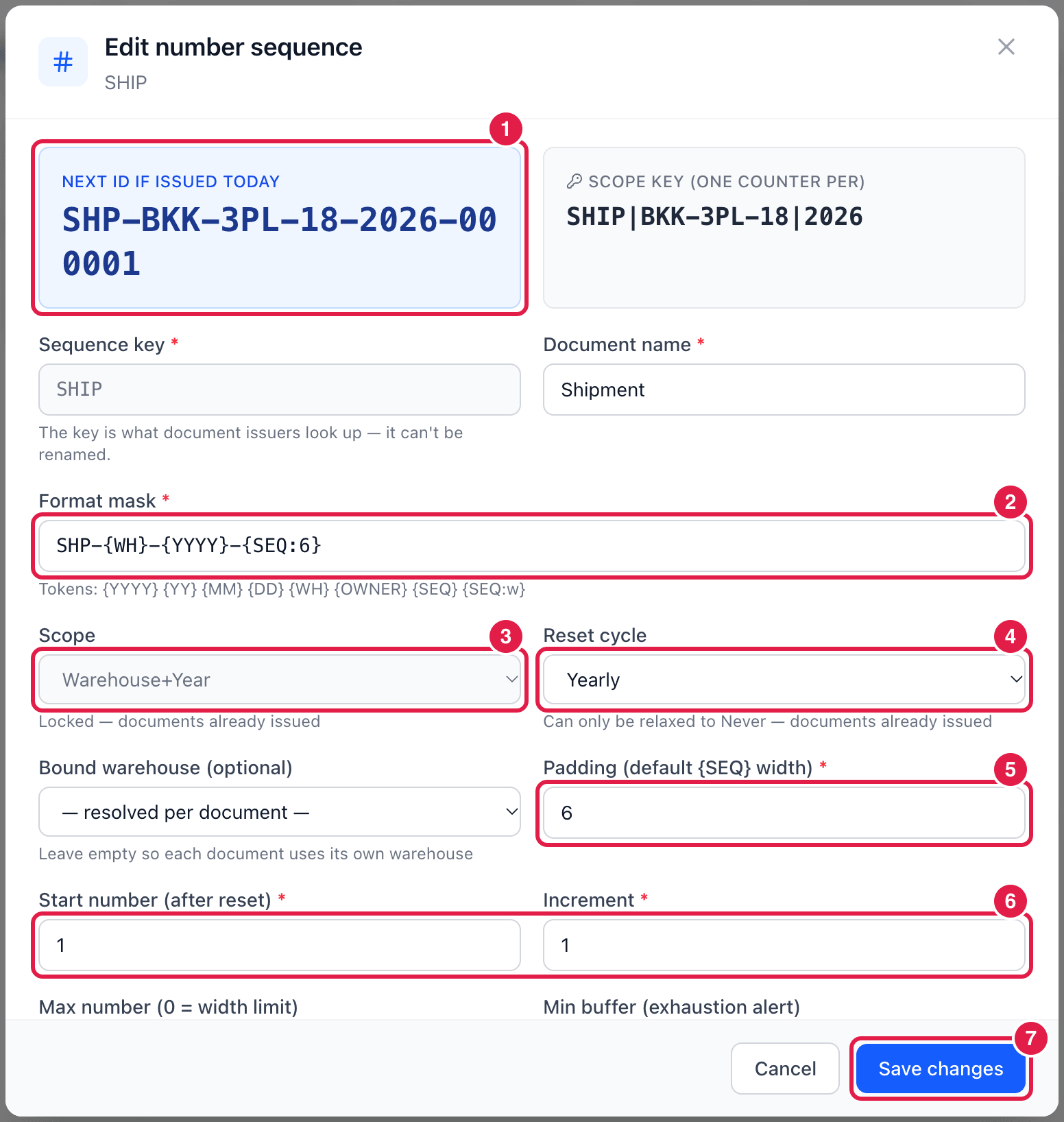
- Next ID if issued today — updates while you type, so you see the result immediately. Scope key next to it shows which counter would be used.
- Format mask — the pattern. Use the tokens from the table above; text outside
{ }is copied as-is. - Scope — one counter per Global, Warehouse, Owner, Year, Warehouse + Year, Owner + Year,
Warehouse + Month or Owner + Month. The mask must contain the matching tokens (e.g.
{WH}for a warehouse scope) — PrismaWMS checks this and warns you. - Reset cycle — when the counter starts again: Never, Yearly, Monthly or Daily.
- Padding — how many digits the running number has when the mask just says
{SEQ}. - Start number and Increment — usually 1 and 1.
- Save changes.
Further down: Max number and Min buffer (warn before the numbers run out), Rollover behavior when the maximum is reached (Block, Widen padding or Wrap with alert), and Status.
The sequence key can never be renamed — it is how PrismaWMS finds the sequence. After the first document has been numbered, the scope is locked and the reset cycle can only be relaxed to Never, so two documents can never end up with the same number.
Only Active sequences issue numbers. If a sequence is inactive, documents of that type fall back to a simple "highest number + 1".
Preview with the Issue Simulator
The Issue Simulator runs the real numbering engine against your live counters — but issues and saves nothing.
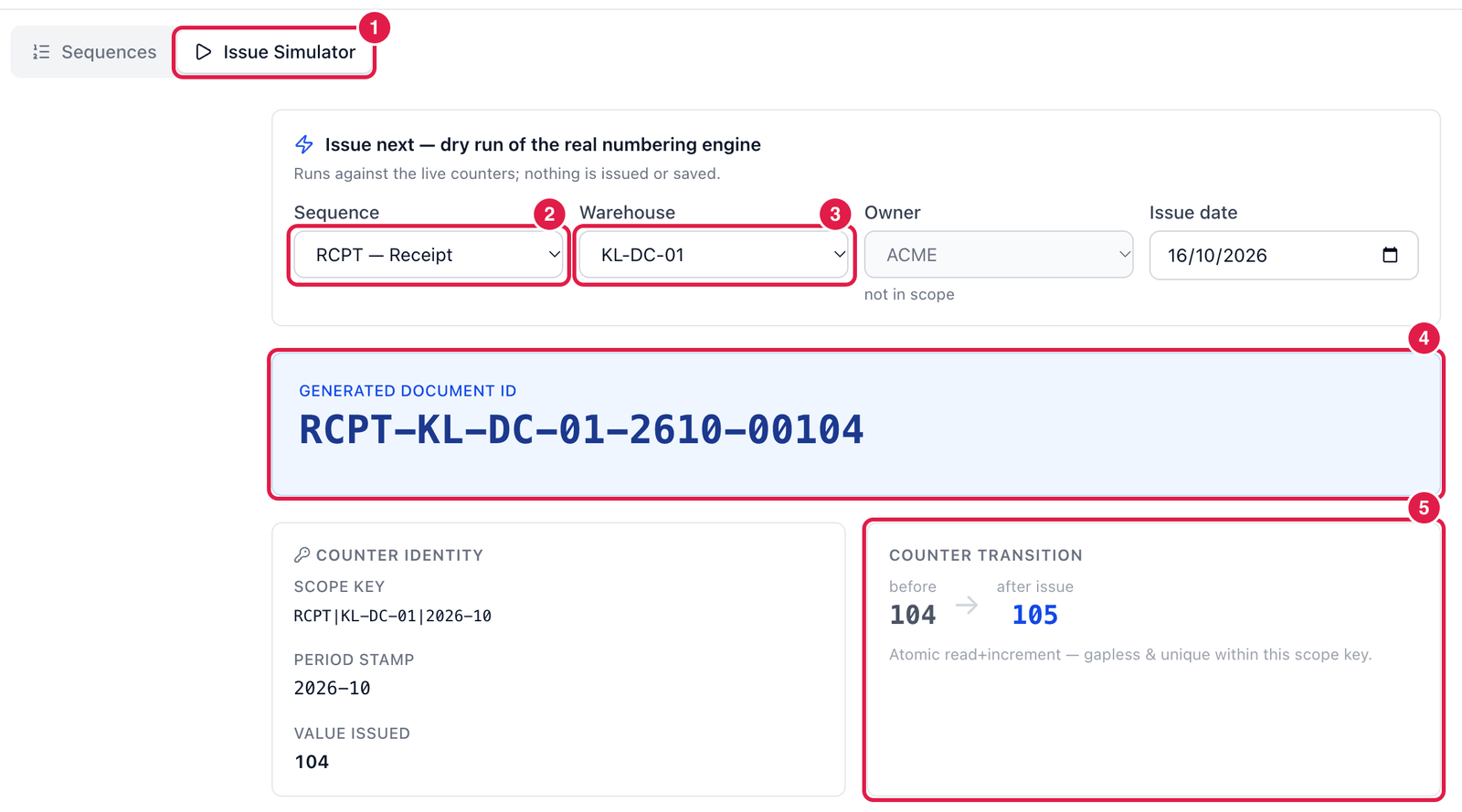
- Issue Simulator tab.
- Sequence — the document type, e.g. RCPT — Receipt.
- Warehouse (and Owner / Issue date when the scope uses them).
- Generated document ID — the number the next receipt in KL-DC-01 would get.
- Counter transition — the counter before (104) and after (105) issuing.
Good to know
- Change a format at the start of a period (e.g. the first day of the month) so the numbers in one month look the same.
- Numbers are never reused — a cancelled document keeps its number.
- Export / Import save and load sequences as a CSV file.