Strategy Rules
When goods are received, PrismaWMS suggests a bin to put them in. When an order is allocated, it decides which stock to reserve. A strategy is the set of rules behind those decisions — for example "dangerous goods only in the DG bay", "chilled goods only in cold bins", "fill the nearest empty bin". You can test any strategy on your real stock and bins before it affects the floor.
Where: Master Data → Strategy Rules
PrismaWMS currently applies Putaway strategies (bin suggestions at receiving and putaway) and Allocation strategies (which stock is reserved for an order). Pick, Replenishment and Task-interleave strategies can already be set up and simulated, but picking and replenishment do not use them yet.
How a strategy decides
Which strategy is used? Each strategy has a scope. PrismaWMS picks the most specific active strategy that matches the goods:
| Rank | Scope | Example |
|---|---|---|
| R1 | Owner + Item group | ACME's beverages |
| R2 | Owner | everything of MediCare Pharma |
| R3 | Item group | all beverages |
| R4 | Order type | e-commerce orders |
| R5 | Warehouse | the house default for KL-DC-01 — every warehouse should have one |
The list
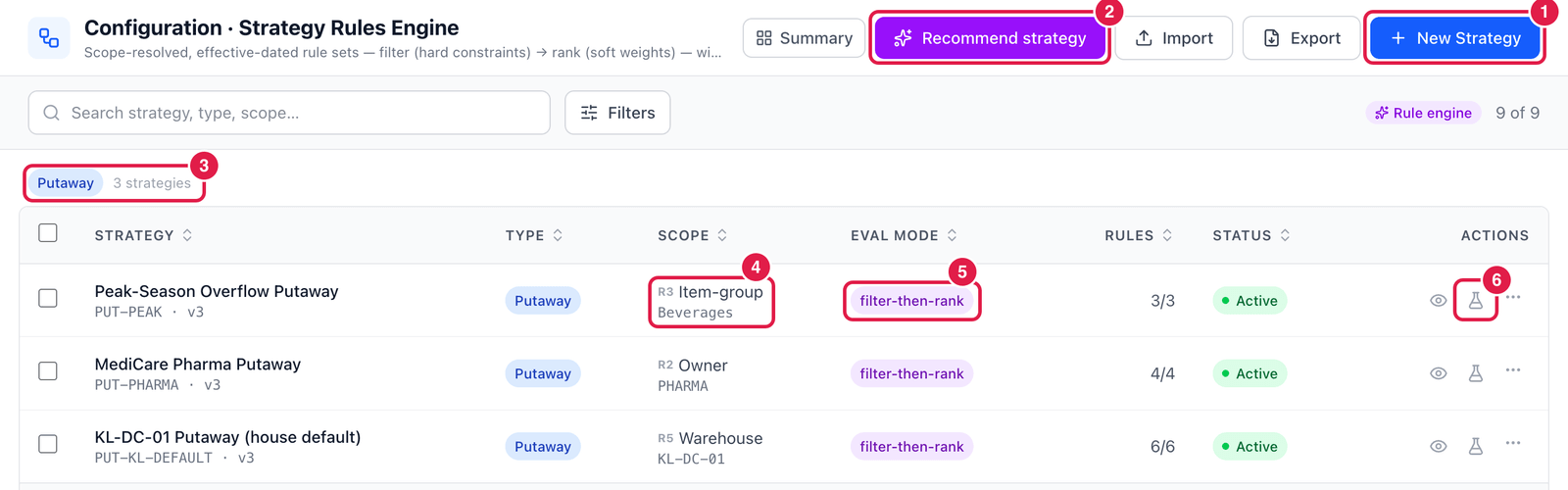
- New Strategy — create a strategy.
- Recommend strategy — rule-based checks on your live strategies, items, locations and stock, e.g. "ALLOC-FEFO can never be exercised — item group Perishables matches no item".
- Groups — strategies are listed per type: Putaway, Allocation, Pick, Replenishment, Task-interleave.
- Scope — R1–R5 and what it applies to (here Item group: Beverages).
- Eval mode — how the rules are combined: filter-then-rank (filter with hard rules, then score with soft rules), first-match (the first rule that matches decides) or best-match.
- Simulate (flask icon) — test the strategy on live data. The eye icon opens the rules.
Read and change the rules
Click a strategy (or the eye icon) to open it.
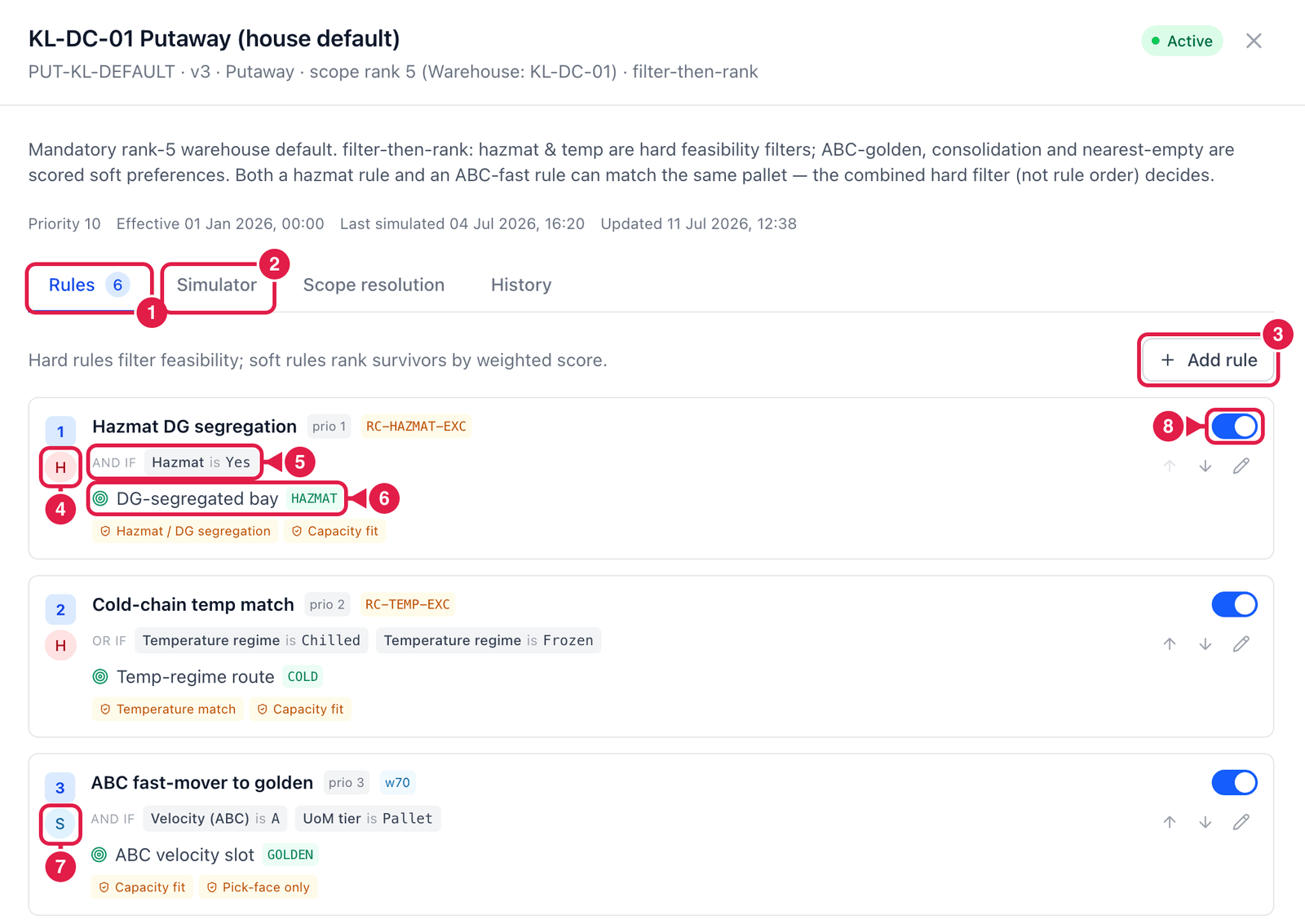
- Rules tab — the rules in order of priority.
- Simulator tab — test on live data (next section). Scope resolution shows which strategy would win for given goods and why the others did not match; History lists every change.
- Add rule — add a rule.
- H = hard rule — a filter. Bins that break it are removed (e.g. hazmat goods only in DG bays).
- Conditions — when the rule applies, e.g. Hazmat is Yes.
- Action — what to do, e.g. DG-segregated bay, plus the checks every bin must pass (Capacity fit).
- S = soft rule — a preference with a weight (
w70): bins that satisfy it score more points. - On / off switch — switch a single rule off without deleting it. Use the arrows to change the order.
Every strategy ends with a Fallback rule — what to do when no bin passes the filters (for example move to a supervised quarantine bin).
Test on live data
On the Simulator tab you pick a real pallet from current stock and see exactly which bin the strategy would choose — nothing is moved.
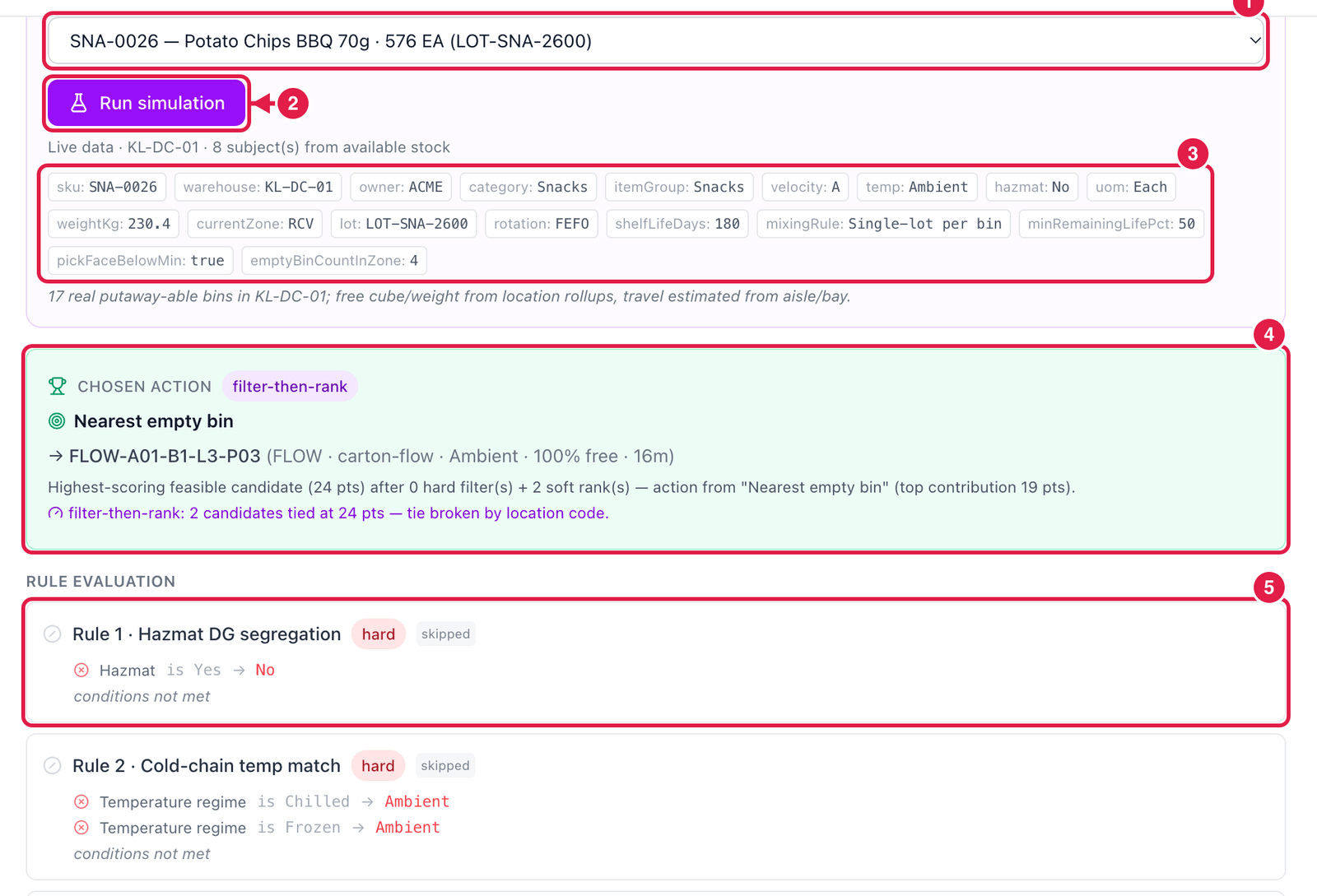
- Subject — a real stock line from this warehouse (SKU, quantity, lot).
- Run simulation.
- Facts — what PrismaWMS knows about the goods: owner, category, velocity (ABC), temperature, hazmat, rotation, lot rules … These are what the conditions are checked against.
- Chosen action — the suggested bin (here
FLOW-A01-B1-L3-P03, 16 m away, 100 % free) and why: its score and which rule contributed most. - Rule evaluation — for every rule: skipped (conditions not met — here the goods are not hazmat), filter, or soft-rank, with the points it gave. Further down, Candidates lists every bin with its score, and the bins that were filtered out with the reason.
Before you activate a change, simulate it with two or three typical pallets (a fast mover, a chilled item, a hazmat item). If a result surprises you, the rule evaluation shows exactly which rule caused it.
Good to know
- Strategies have a version (
v3), a priority and effective dates — a strategy outside its dates is skipped (shown as not in effect for date under Scope resolution). - The item's own rotation rule (FEFO / FIFO) still applies during allocation — PrismaWMS enforces FEFO for an item set to FEFO even if the strategy says otherwise.
- Bin suggestions only ever propose a bin the stock engine will accept (status, temperature, hazmat, owner, mixing and capacity are always checked).